Key takeaways
- Run the round in eight steps: requirements, estimates, API, data model, short codes, high-level design, deep dives, trade-offs.
- Do the arithmetic aloud: 100 million links a day is about 1,160 writes a second, 11,600 reads a second and 91 TB over five years.
- Seven base62 characters give about 3.5 trillion codes. Six give 56.8 billion, which runs out in about a year and a half at this scale.
- Return 302 when you need accurate click counts. Browsers can cache a 301, so repeat clicks may never reach you.
- Keep the redirect path short: cache, key lookup, redirect. Clicks go through a queue.
How does a URL shortener system design interview run?
The interviewer says “Design a URL shortener, like TinyURL or Bitly” and waits. The question fits in one round and still has real depth: ID generation, a read-heavy cache, sharding, and a choice between two HTTP status codes that changes what the business can measure.
What gets graded is how you drive. A good round follows a fixed order, and each step produces something the next one uses.
| Step | Minutes | What you produce |
|---|---|---|
| 1. Requirements | 4–5 | Functional and non-functional list, agreed with the interviewer |
| 2. Estimates | 4–5 | Reads and writes per second, storage, cache size |
| 3. API | 3 | POST /urls, GET /{code} and the redirect status |
| 4. Data model | 3 | One main table and its key |
| 5. Short codes | 5–7 | A generation scheme and the code length |
| 6. High-level design | 5–7 | One diagram with a read path and a write path |
| 7. Deep dives | 10–12 | Two or three areas the interviewer picks |
| 8. Trade-offs | 3–5 | Bottlenecks, failures, what you'd change |
In a 60-minute round, spend the extra time on deep dives. If the interviewer pushes you somewhere else, follow them: the order is a default, not a script.
Step 1: what are the functional and non-functional requirements?
Start by asking, not drawing:
- Can anyone shorten a link, or only signed-in users with API keys?
- Can users choose a custom alias, like
/diwali-sale? - Do links expire? Do we need click analytics, and how fresh?
- How many new links a day, and how many clicks per link?
- Can a link's destination change after it is created?
Then say the agreed list back. The 50 ms target and the 100 million links a day at 10 clicks per link are the numbers Helpwing's own URL-shortener demo uses. If the interviewer gives none, propose these and ask whether they are reasonable.
Functional requirements
- Turn a long URL into a short link.
- Redirect a short link to its original URL.
- Let users set a custom alias and an expiry date.
- Show click analytics for each link.
Out of scope, said aloud: editing a link's destination, QR codes, link-in-bio pages.
Non-functional requirements
- Latency: redirects in under 50 ms at our servers, at the 99th percentile.
- Availability: a dead short link is a broken link in someone's email or printed poster. Aim for 99.99% on redirects, about 53 minutes of downtime a year.
- Scale: 100 million new links a day, 10 clicks for every new link.
- Consistency: a link works the moment the API returns it. Analytics can lag by a few minutes.
- Security: codes are not guessable in sequence, so nobody can walk through other people's links.
Step 2: back-of-the-envelope estimates, with the maths
Say each step aloud. A day has 86,400 seconds; rounding it to 100,000 makes mental maths easy and only makes per-second figures about 14% low.
- Writes: 100,000,000 ÷ 86,400 ≈ 1,160 a second. Assume the peak is three times the average: about 3,500 a second.
- Reads: 10 × 100 million = 1 billion redirects a day, or about 11,600 a second, and about 35,000 at peak.
- Links in five years: 100 million × 365 × 5 = 182.5 billion.
- One record: a 7-byte code, a long URL averaging 100–200 bytes (up to 2,048), timestamps, an owner ID and index overhead. Round up to 500 bytes.
- Storage: 182.5 billion × 500 bytes ≈ 91 TB, or about 274 TB with three replicas.
- Cache: clicks follow a power law, so assume the hottest 20% of links take about 80% of clicks. If all 1 billion daily clicks were on different links, 20% is 200 million entries × 500 bytes = 100 GB. That fits on four 32 GB cache nodes, each with a replica.
- Bandwidth: about 0.6 MB a second in and 5.8 MB a second out. Not a bottleneck; say so and move on.
| Quantity | Working | Result |
|---|---|---|
| Writes per second | 100M ÷ 86,400 | ~1,160 average, ~3,500 peak |
| Reads per second | 1B ÷ 86,400 | ~11,600 average, ~35,000 peak |
| Links in 5 years | 100M × 365 × 5 | 182.5 billion |
| Storage in 5 years | 182.5B × 500 bytes | ~91 TB, ~274 TB with 3 replicas |
| Cache | 200M × 500 bytes | ~100 GB |
Estimates only earn their time if they change a decision. The 10:1 read ratio says put a cache in front. 91 TB says one database server won't hold it: shard. 1,160 writes a second is modest, so any code scheme in step 5 can keep up.
Step 3: API design, POST /urls and GET /{code}
Two endpoints carry the system:
POST /urls
Authorization: Bearer <api-key>
Content-Type: application/json

{
  "long_url": "https://example.com/blog/2026/10/a-very-long-path?utm_source=mail",
  "custom_alias": "diwali-sale",
  "expires_at": "2026-12-31T23:59:59Z"
}

201 Created
{
  "code": "diwali-sale",
  "short_url": "https://s.example/diwali-sale",
  "expires_at": "2026-12-31T23:59:59Z"
}

GET /aZ3kP9q

302 Found
Location: https://example.com/blog/2026/10/a-very-long-path?utm_source=mailcustom_aliasandexpires_atare optional. Without an alias, the server generates a 7-character code.- Create errors: 400 for an invalid URL, 409 Conflict if the alias is taken, 429 Too Many Requests over the rate limit.
- Redirect errors: 404 Not Found for an unknown code, 410 Gone for an expired one.
- If time allows:
GET /urls/{code}/statsandDELETE /urls/{code}for the owner.
301 or 302: which redirect should a URL shortener return?
Interviewers ask this to check that you understand HTTP caching. Under RFC 9110, a 301 Moved Permanently response is cacheable by default: a browser may store it and send repeat clicks straight to the destination. A 302 Found is not stored unless your headers allow it, so every click comes back to you.
| 301 Moved Permanently | 302 Found | |
|---|---|---|
| Cached by browsers by default | Yes, unless headers say otherwise | No, unless headers allow it |
| Click analytics | Misses repeat clicks | Counts every click |
| Change or expire a link later | Browsers that cached it won't notice | Takes effect on the next click |
| Load on your servers | Lower | Higher |
| Fits when | Permanent links, no per-click analytics | Analytics, expiry or editable links |
For this design, return 302: analytics and expiry are requirements. A 301 with an explicit Cache-Control: max-age caps how long browsers keep it, but you still lose repeat clicks inside that window. 307 and 308 are the versions of 302 and 301 that forbid changing the request method; for a click, which is a GET, they behave the same.
Step 4: data model
The access pattern decides the store. Every redirect is one lookup by code, every create is one insert, and nothing on the hot path needs a join.
| Field | Type | Notes |
|---|---|---|
| code | string, up to 30 characters | Primary key and shard key; 7 characters when generated |
| long_url | string, up to 2,048 characters | The destination |
| user_id | integer, can be empty | Owner; empty for anonymous links |
| created_at | timestamp | Audits and cleanup |
| expires_at | timestamp, can be empty | Empty means it never expires |
| is_custom | boolean | True for user-chosen aliases |
A small users table holds accounts, API key hashes and limits. For a “my links” page, index user_id, or in a key-value store keep a second table keyed by it. Click events go to a separate analytics store (step 7).
Step 5: how do you generate the short code?
Settle the length first. Base62 uses the digits 0–9, a–z and A–Z.
- 62⁶ = 56,800,235,584 codes. At 100 million links a day, that lasts 568 days.
- 62⁷ = 3,521,614,606,208, about 3.5 trillion codes. That lasts about 96 years.
- After five years you have used 182.5 billion codes, about 5% of the 7-character space.
So use seven characters. Then pick how to make each one unique.
Option 1: hash the long URL and handle collisions
Hash the URL with MD5 or SHA-256, reduce the hash modulo 62⁷, base62-encode it and pad to seven characters.
- Don't take the first seven characters of the base62-encoded hash. A 128-bit hash encodes to about 22 characters, and roughly 9 times in 10 the first is a digit from 1 to 7, so the codes cluster.
- Collisions grow as the space fills: at 5% full, about 1 new code in 20 is already taken. Use a conditional insert (write only if the code is free) and, on a conflict, add an attempt number to the input and hash again.
- Upside: no coordination between servers.
- Downside: writes that can fail and retry, and one shared link per URL unless you add the user ID to the input.
Option 2: base62 of a counter, with a range server
Give every link a unique integer and encode it. Uniqueness comes from the counter, so there is nothing to check.
- One global counter would be a bottleneck. Instead, a range server (or ticket server) hands each app server a block of, say, 1 million IDs, which it uses from memory.
- With 20 app servers sharing 1,160 writes a second, each uses about 58 IDs a second, so a block lasts about 4.8 hours. The range server can be one replicated database row with an atomic increment, or a counter in ZooKeeper or etcd.
- A crashed server wastes the rest of its block: at most 1 million IDs out of 3.5 trillion.
- Sequential IDs make neighbouring, guessable codes. Scramble each ID with a keyed, reversible permutation over the 62⁷ range (format-preserving encryption does exactly this), then encode and pad to seven characters. (If you encode the raw counter instead, start it at 62⁶ so every code is seven characters.)
Option 3: pre-generated keys from a key generation service
A key generation service (KGS) creates random 7-character codes ahead of time. App servers fetch them in batches of, say, 1,000.
- Batches must be claimed atomically, in a transaction that marks keys as used, or by giving each KGS replica its own slice, so no two servers get the same code.
- One year of keys is 36.5 billion × 7 bytes ≈ 256 GB, or generate a few days ahead.
- Upside: no collision check at write time, and random-looking codes.
- Downside: one more stateful service to run. Keys held by a crashed server are lost, which is fine at this scale.
| Hash + collision check | Base62 counter + range server | Pre-generated keys (KGS) | |
|---|---|---|---|
| Collisions | Yes; check and retry | None | None if claiming is atomic |
| Coordination | None | Once per block | Once per batch |
| Guessable codes | No | Yes, unless scrambled | No |
| Same URL, same code | Yes, by default | No | No |
| Main risk | Retries grow as the space fills | Range server availability | Key service availability |
| Interview verdict | Good, if you explain collisions | Great, with ranges and scrambling | Great, if you explain atomic claiming |
For this design, pick the counter with a range server and a scramble, and mention the KGS as the alternative you considered. Here is the encoding in Python, with the hash variant from option 1. The outputs in the comments are from running it.
import hashlib

ALPHABET = "0123456789abcdefghijklmnopqrstuvwxyzABCDEFGHIJKLMNOPQRSTUVWXYZ"
BASE = len(ALPHABET)  # 62
INDEX = {ch: i for i, ch in enumerate(ALPHABET)}
CODE_LEN = 7


def encode(n: int) -> str:
    """Non-negative integer ID -> base62 string."""
    if n < 0:
        raise ValueError("id must be non-negative")
    if n == 0:
        return ALPHABET[0]
    chars = []
    while n:
        n, rem = divmod(n, BASE)
        chars.append(ALPHABET[rem])
    return "".join(reversed(chars))


def decode(code: str) -> int:
    """Base62 string -> integer ID."""
    n = 0
    for ch in code:
        n = n * BASE + INDEX[ch]
    return n


def code_from_hash(long_url: str, attempt: int = 0) -> str:
    """Option 1: hash, reduce modulo 62**7, pad to 7 characters.
    If the code is taken by another URL, call again with attempt + 1."""
    digest = hashlib.sha256(f"{long_url}#{attempt}".encode()).digest()
    n = int.from_bytes(digest[:8], "big") % BASE**CODE_LEN
    return encode(n).rjust(CODE_LEN, ALPHABET[0])


print(BASE**7)                    # 3521614606208, about 3.5 trillion
print(encode(BASE**6))            # 1000000 (the smallest 7-character ID)
print(encode(BASE**7 - 1))        # ZZZZZZZ (the largest)
print(encode(125_000_000_000))    # 2crtgcg
print(decode("2crtgcg"))          # 125000000000
print(code_from_hash("https://example.com/a/very/long/path"))  # KLrgbRn
Step 6: what does the high-level design look like?
Draw two paths in separate services, because they scale differently: about 35,000 redirects a second at peak against about 3,500 creates.
- Write path: the client calls
POST /urlsthrough the load balancer and API gateway, which checks the API key and rate limit. The shortening service validates the URL, takes the next ID from its block, scrambles and encodes it, writes the row with a conditional insert, warms the cache and returns the short URL. - Read path: the browser requests
GET /{code}. The redirection service checks the cache, falls back to the database on a miss, checks expiry, returns a 302 with theLocationheader, and publishes a click event to a queue without waiting.
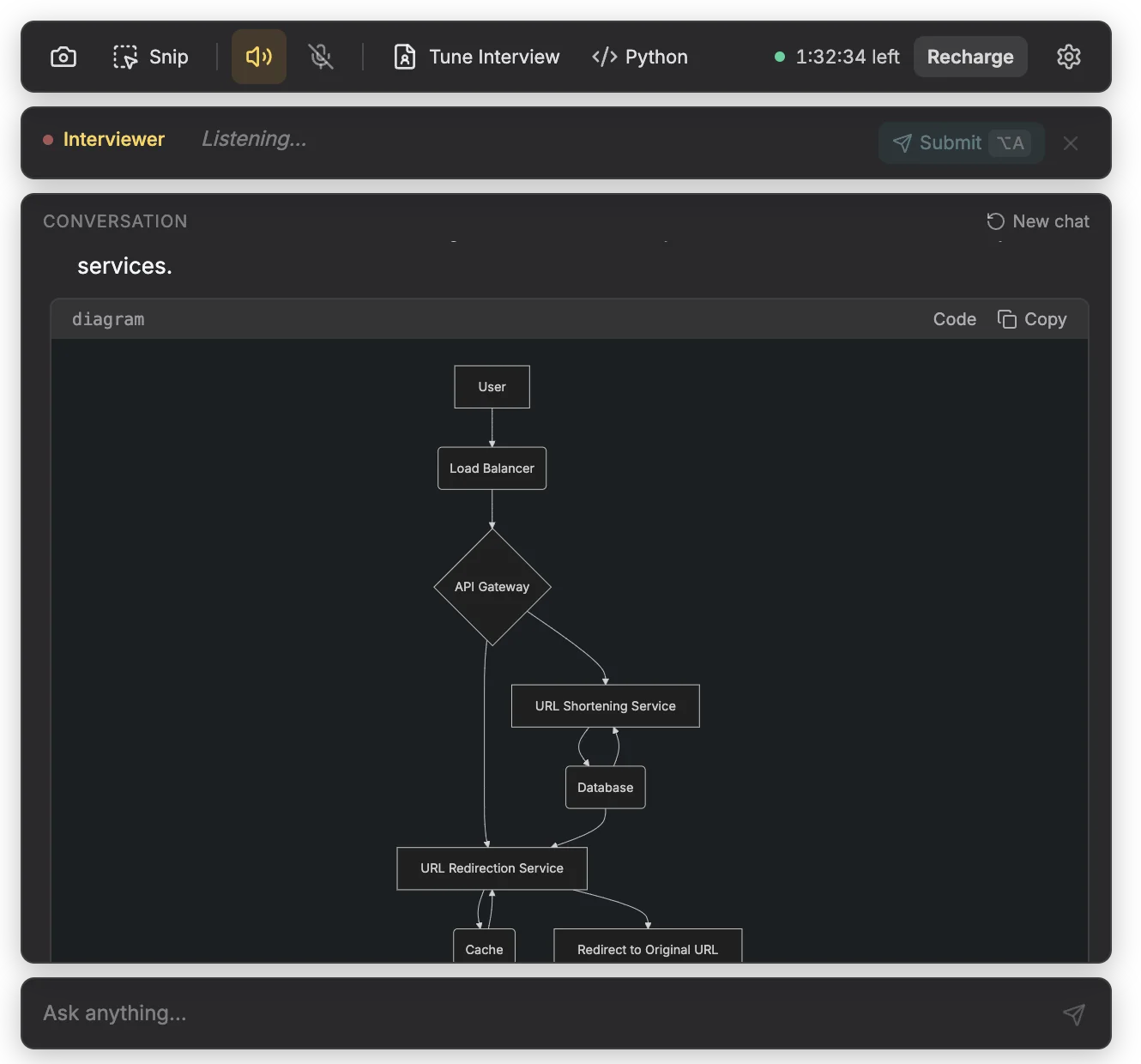
That split between writes and reads is what interviewers want to see by about the halfway mark. The deep dives add what an SDE-2 answer builds on top: the range server, the click queue, the analytics store and the rate limiter.
Step 7: deep dives
The interviewer usually picks two or three. Have a short, specific answer for each.
Caching hot links
- Pattern: cache-aside in Redis. Key: the code. Value: the long URL and its expiry. On a miss, read the database and set the entry.
- TTL and eviction: about a day, never past the link's expiry, with least-recently-used eviction.
- Warm on create: links are often clicked minutes after they are shared.
- Negative caching: cache “not found” for a minute, so typos and scanners don't reach the database.
- Hot keys: one viral link can overload a cache shard. Add an in-process cache on each redirect server with a TTL of a few seconds.
- Database load: at a 90% hit rate, about 1,160 reads a second on average and 3,500 at peak.
- Latency: a cache lookup inside a data centre takes around a millisecond, leaving most of the 50 ms for the network. For distant users, serve redirects from more than one region.
Database choice and sharding
The data is 182.5 billion small rows, read and written one key at a time. A key-value or wide-column store such as DynamoDB or Cassandra fits that shape directly. Sharded MySQL or PostgreSQL (with Vitess or Citus, for example) also works and gives you unique constraints, but you own more of the sharding. Either is fine if you give the reason.
- Shard by a hash of the code with consistent hashing, not by code ranges. New links are the hottest, and with counter-based codes, range sharding would send them all to the newest shard.
- Shard count: at about 2 TB per shard, 91 TB needs about 46 shards; plan for 50 to 64, each replicated.
- Uniqueness: a conditional write:
INSERT ... ON CONFLICT DO NOTHINGin PostgreSQL,attribute_not_existsin DynamoDB,IF NOT EXISTSin Cassandra. - Replica lag: a brand-new link read from a replica can come back missing. Warming the cache on create covers most cases; check the primary before returning a 404.
Custom aliases
- Validate: letters, digits and hyphens, 4 to 30 characters, and block reserved words such as
api,adminandlogin. - Uniqueness: the same conditional insert. On a conflict, return 409.
- Clashes with generated codes: a 7-character alias could later equal a generated code. Keep separate namespaces, for example by requiring aliases to be at least 8 characters or contain a hyphen.
- Abuse: aliases like
bank-kyc-updateinvite phishing. Flag sensitive words for review.
Expiry
- Check on every redirect: the cache entry carries
expires_at, and its TTL never outlives the link. - Status: 410 Gone, which RFC 9110 describes as suited to limited-time, promotional resources. Use 404 if you'd rather not reveal the link existed.
- Cleanup: delete lazily with DynamoDB or Cassandra TTLs, or a nightly job that deletes in small batches.
- Don't recycle codes: old links live on in PDFs and printed posters, and a reused code would send those readers somewhere new. With 3.5 trillion codes, you don't need to.
Analytics with an async queue
Never increment a counter in the urls table on every redirect: that is 11,600 writes a second on the hot path and a hot row for every viral link.
- The redirect server sends the 302, then publishes an event to Kafka or Kinesis: code, time, country from the IP address, referrer, device. If the queue is slow, it drops events rather than delay redirects.
- Consumers aggregate clicks per code per minute, hour and day into an analytics store such as ClickHouse or Druid. The stats API reads those aggregates.
- Volume: 1 billion events a day at about 100 bytes is about 100 GB a day before compression. Keep raw events briefly, aggregates for longer.
- Duplicates: queues usually deliver at least once, so deduplicate on an event ID or accept approximate counts. Count unique visitors with HyperLogLog.
- Noise and privacy: chat apps fetch links to build previews, so filter known bots. Derive the country, then drop or hash the IP address.
Rate limiting and abuse
- Create path: a token bucket per API key and per IP address at the gateway, counted in Redis, with the lowest limits for anonymous callers. Over the limit, return 429 with a
Retry-Afterheader. - Redirect path: limit 404s per IP address to slow down anyone scanning for codes.
- Malicious destinations: check new URLs against a malware and phishing list such as Google Safe Browsing, re-scan old links, and disable flagged ones or show a warning page.
- Loops and input: refuse to shorten your own short links, cap URLs at 2,048 characters, and accept only
httpandhttps.
Step 8: bottlenecks and trade-offs
Finish by naming what breaks first and what you chose to give up.
| Risk | What goes wrong | Mitigation |
|---|---|---|
| Cache cluster fails | Up to 35,000 reads a second hit the database | Cache replicas, request coalescing, database sized for peak misses |
| One viral link | One cache shard takes most traffic | In-process cache for a few seconds |
| Range server down | No new ID blocks | Servers hold blocks for hours; run it replicated |
| Replica lag | A new link returns 404 briefly | Warm the cache on create; check the primary before a 404 |
| Queue backs up | Analytics fall behind | Redirects never wait on it; scale consumers |
| Region outage | Redirects fail in that region | Serve reads from several regions; give each region its own ID ranges |
The trade-offs to say aloud: 302 buys accurate analytics and control at the cost of more load; the counter trades collision checks for a little coordination; one link per URL saves storage but mixes analytics and expiry across owners; and analytics are eventually consistent while links are not.
Close with a 30-second summary:
To sum up: we create about 1,200 links a second and serve about 11,600 redirects a second, so the design is built around reads. A shortening service takes ID blocks from a range server, scrambles each ID and stores a 7-character base62 code, which gives us about 3.5 trillion codes. A redirection service reads through a Redis cache to a key-value store sharded by code, returns 302 so we count every click, and sends click events to Kafka. With more time, I'd look at multi-region reads and abuse detection.
What a weak, good and strong answer covers
Most candidates draw the same boxes. The difference is what they can say about each one.
| Area | Weak | Good | Strong |
|---|---|---|---|
| Requirements | Starts drawing at once | Functional list | Adds latency, availability and read:write ratio; asks about aliases, expiry, analytics |
| Estimates | None, or never used | Requests per second, storage | Adds cache size; says which decision each number changes |
| Short codes | “Hash the URL”, no collision plan | One scheme, done correctly | Compares schemes, sizes the key space, handles guessable codes |
| Redirect | “Return the URL” | 301 or 302 | 302, with reasons tied to analytics and expiry |
| Read path | Database on every click | Adds a cache | TTL, negative caching, hot keys, cache failure |
| Storage | A database with no reason | Keyed by code | Reasons from access pattern; hash sharding; replica lag |
| Analytics | Counter per click | Async logging | Queue, aggregation, analytics store, duplicates, privacy |
| Failure and abuse | Not mentioned | Rate limits | Rate limits, malware checks, enumeration, regions |
What is expected at SDE-1, SDE-2 and SDE-3?
At SDE-1 the interviewer helps you along. At SDE-3 they expect you to steer.
| Level | You should drive | Expected depth | Often probed on |
|---|---|---|---|
| Fresher or SDE-1 (0–2 years) | Requirements, API, schema, a working diagram, with some prompting | One code scheme done correctly, why 7 characters, a cache | “What if two servers generate the same code?” |
| SDE-2 (2–5 years) | The whole flow unprompted, with estimates that change decisions | Code schemes compared, sharding, caching, 301 vs 302, analytics queue | “The cache cluster goes down. What happens?” |
| SDE-3 or senior (5+ years) | Which deep dives matter, and why | Failure modes, regions, replica lag, abuse, cost | “How do you run this in two regions?” |
URL shortener system design for freshers
For a fresher or SDE-1, the bar is a correct, complete basic design, not a lecture on distributed systems. Be able to explain without notes: why 62⁷ gives about 3.5 trillion codes, the requests-per-second arithmetic, 301 versus 302, cache-aside, and what you shard on.
If you built a URL shortener as a college project, use it: see how to explain your project in an interview. For a full plan, start with the software engineer interview preparation guide and the free picks on interview resources.
Every redirect is a lookup by one key, and in five years we'll have around 180 billion rows and 90 TB, with no joins. So I'd pick a key-value store like DynamoDB or Cassandra, partitioned by a hash of the short code. We run Oracle in my current project, and sharded MySQL would work too, but then I'd own the sharding logic. Either way, a conditional insert makes sure an alias can only be claimed once.
At peak the database would jump from about 3,500 reads a second to 35,000, and we'd blow the 50 ms budget. I'd defend in layers: a replica for each cache shard, a small in-process cache on each redirect server for the hottest links, and request coalescing so a thousand misses on one code become one database read. I'd also size the database for a partial cache loss and load-test it.
How Helpwing helps in this round
In system design rounds where the employer allows AI help, Helpwing hears the question and answers with the design in points plus one diagram, like the figure above. Add your resume and the job description in Tune Interview before the round so answers stay inside your own experience, and tell your interviewer you are using it. It is not for exams, online assessments, coding tests or proctored tests. See how it works or check what 15 free minutes include.
Questions people ask
Is the URL shortener asked in system design interviews for freshers?
It is a standard first design question because it fits in one round, so prepare it first if your loop has a design round. At fresher level, interviewers look for clear requirements, basic estimates, one correct code scheme and a cache.
How many characters should a short URL code be?
Seven base62 characters give about 3.5 trillion codes, enough for about 96 years at 100 million links a day. Six give 56.8 billion, which would last about a year and a half at that rate.
Why base62 and not base64?
Standard base64 includes + and /, which mean something in URLs. The URL-safe variant uses - and _, which works but is easy to mistype. Base62 keeps codes to letters and digits, and you lose little: 64⁷ is about 4.4 trillion.
Should a URL shortener return 301 or 302?
Return 302 if you need click analytics, expiry or editable links: browsers don't cache it by default, so every click reaches you. A 301 can be cached, which lowers load but hides repeat clicks.
SQL or NoSQL for a URL shortener?
Either, if you reason from the access pattern: single-key lookups, 182.5 billion rows, no joins. DynamoDB or Cassandra fits that with less work; sharded MySQL or PostgreSQL gives you unique constraints but you manage the sharding.
What happens if two people shorten the same long URL?
With the hash scheme they get the same code unless you add the user ID to the input. With a counter or pre-generated keys they get different codes, which is usually better: each owner gets their own analytics and expiry.
Sources
- RFC 9110: HTTP Semantics, section 15.4 (301, 302, 307, 308) and section 15.5.11 (410 Gone), IETF, checked 21 October 2026
- RFC 6585: Additional HTTP Status Codes, section 4 (429 Too Many Requests), IETF, checked 21 October 2026
- RFC 4648: The Base16, Base32, and Base64 Data Encodings, sections 4 and 5, IETF, checked 21 October 2026