Key takeaways
- A live assistant has five parts: listening, speech-to-text, your context (resume and job description), a language model, and an on-screen overlay.
- The loop takes a few seconds, so you still have to keep talking while the answer appears.
- It can mishear, get facts wrong, or make you sound scripted. Treat its answer as notes, not a script.
- Prep tools, live assistants and AI interviewers are three different things, with different rules.
- Company rules differ: some build AI into certain rounds, others allow none. Ask the recruiter first.
What is an AI interview assistant?
An AI interview assistant (also called an interview copilot, a virtual interview assistant or a real-time interview helper) is an app that helps you answer questions during a live interview. It hears the question, works out what is being asked, and shows a suggested answer in a few seconds.
"Copilot" is a fair description of the idea: you are still the one speaking and making decisions; the software suggests. It is not a person on the call, it does not speak for you, and it cannot take the interview on your behalf.
Most of the live assistants we compared are desktop apps for video interviews on Zoom, Google Meet or Microsoft Teams; some also run in a browser or on a phone. Many also read a screenshot, so they can help with a coding problem shown on screen.
How does an AI interview assistant work?
Every real-time assistant chains the same five parts. Knowing them helps you understand why answers are sometimes slow or wrong.
| Part | What it does | What can go wrong |
|---|---|---|
| 1. Listening | Captures the interviewer's voice from your computer's audio or your microphone | It hears nothing if the wrong source is picked, or hears you instead of them |
| 2. Speech-to-text | Turns the audio into a running transcript | Accents, crosstalk and jargon ("idempotent", "Kafka") get misheard |
| 3. Your context | Adds your resume, the company, the job description and notes | Without it, answers are generic and may invent experience |
| 4. Language model | Reads the question plus your context and drafts an answer | Wrong facts stated confidently; a slower model means a longer wait |
| 5. Overlay | Shows the answer in a small window on your screen | A long answer is hard to read while you talk |
Listening: system audio or microphone?
The interviewer's voice reaches your laptop through the meeting app. An assistant can pick it up in two ways:
- System audio: it captures what your computer is playing, the same sound you hear in your headphones. This is the cleaner source, and it is the only one that works when you wear headphones, because your microphone can't hear sound that only goes into your ears.
- Microphone: it listens to the room. This works with laptop speakers, but it also hears you, your fan and the traffic outside.
If an assistant shows nothing when the interviewer speaks, the audio source is the first thing to check.
Speech-to-text: where most mistakes start
The transcript is the assistant's only view of the question. If "Postgres" is heard as "post-grads", or two people talk at once, the model answers the wrong question with full confidence. Good assistants show the transcript so you can see what they heard, and let you type or correct the question yourself.
Your context: why the resume and job description matter
A language model knows a lot about Kafka in general and nothing about your Kafka project. When you add your resume and the job description before the interview, the assistant puts them next to every question. That is what turns "tell me about yourself" from a generic paragraph into an answer about your actual role, stack and results. It is also what stops a careless tool from inventing an employer or a project you never had.
The language model and the overlay
The model drafts the answer, and the overlay shows it. Two design choices matter here:
- Speed against depth. Smaller models answer faster; larger ones give more detail but make you wait longer. For a spoken interview, a fast, short answer is usually more useful than a long, perfect one.
- Answer shape. An answer you can use while talking starts with one or two sentences you could say, then a few points to expand on. A wall of text is no help mid-sentence.
A worked example: one question through Helpwing
Here is the whole loop with Helpwing, using a backend engineer with three years of Java and Spring Boot experience at a payments company, interviewing for an SDE-2 role.
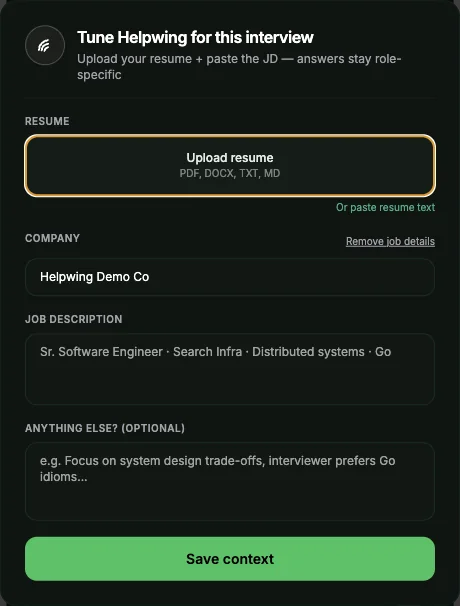
Before the interview, they open Tune Interview and add their resume, the company, the job description and a note ("led the move from a cron job to Kafka for payment events"). Helpwing uses this so that answers stay inside their own experience, with no invented employers.
During the interview, the interviewer asks: "Why did you use Kafka for payment events instead of a simple queue?" Helpwing hears it through system audio or the microphone, and a few seconds later the overlay shows an answer in its spoken-question shape: a "Say this" line, then key points, then what to add if they dig deeper.
Say this: We chose Kafka because three services needed to read the same payment events, and we had to replay events after a failure; a simple queue deletes a message once one consumer reads it.
Key points: each service reads from its own position in the log · replay let us rebuild the ledger after a bad deploy · partitions by merchant ID kept events in order for each merchant · the cost was running and monitoring a Kafka cluster.
If they dig deeper: how we handled duplicate events (idempotency keys on the ledger write), and why we didn't choose RabbitMQ (we needed replay more than routing).
The candidate glances at the first line, then answers in their own words, using the points as a checklist. The numbers and details in that sample are illustrative; your own answer has to come from your own project, which is exactly why the resume matters.
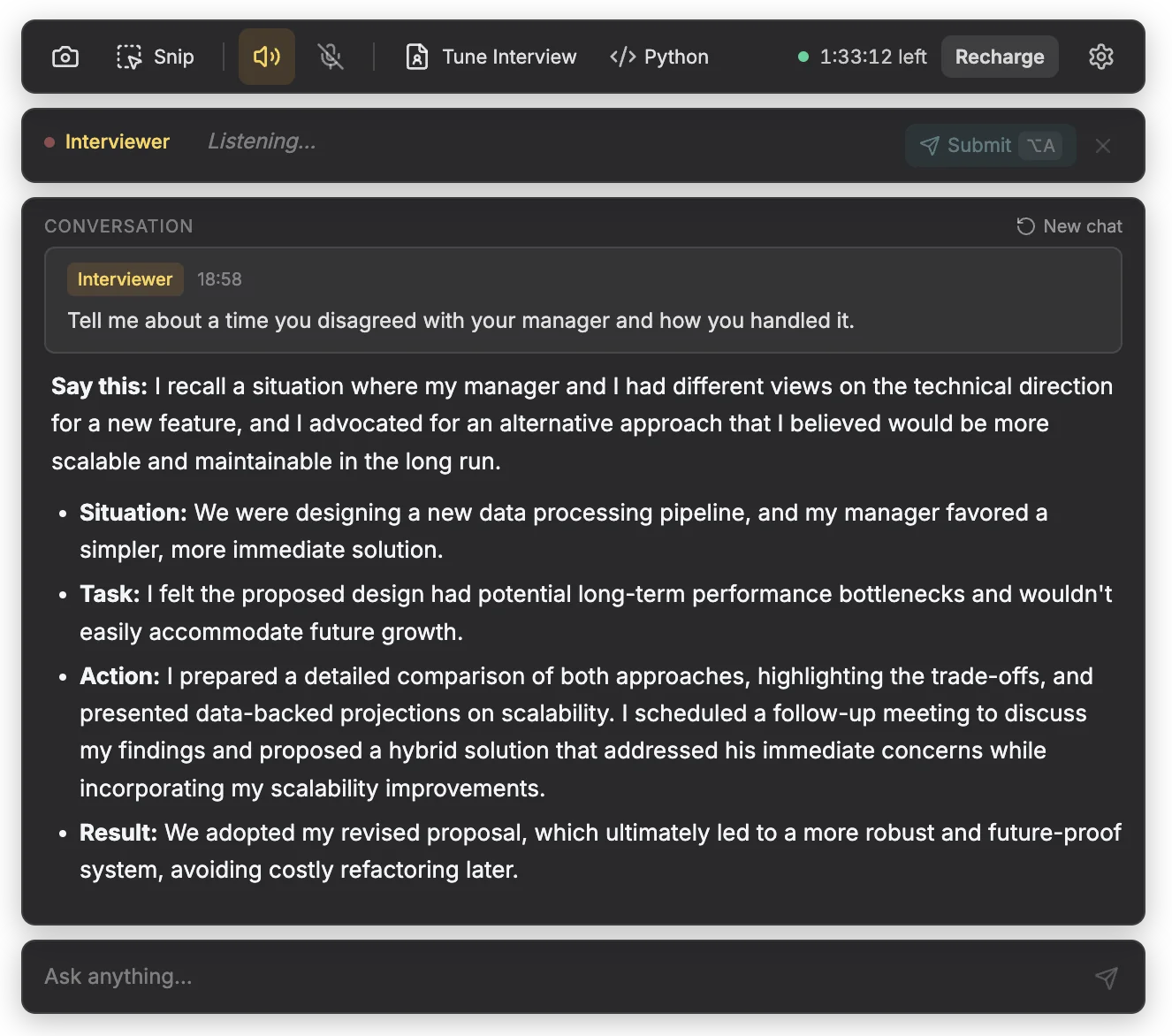
Other questions get other shapes. A behavioural question ("tell me about a time you disagreed with your manager") gets a STAR answer: situation, task, action, result. A coding problem shared as a screenshot or snip gets the approach, code, complexity and edge cases. A system design question gets the design in points plus one diagram.
Prep tools, live assistants and AI interviewers: what's the difference?
"AI interview tool" can mean three different things, and searches mix them up. The difference that matters most is who uses the tool and when.
| Prep tool | Live interview assistant | AI interviewer | |
|---|---|---|---|
| Who uses it | You | You | The employer |
| When | Days or hours before the interview | During the live interview | During a screening round |
| What it does | Quizzes you, critiques your answers, explains concepts | Hears questions and suggests answers in real time | Asks you questions and records or scores your answers |
| Examples | A chatbot such as ChatGPT, Claude or Gemini; practice apps | Helpwing and the tools in our comparison | Screening software some recruiters use |
| Is it allowed? | Yes: preparing is your own business | Only where the employer allows AI help for that round | You are the one being interviewed; follow its rules |
Some companies that keep live interviews AI-free still welcome AI for preparation. Anthropic's candidate guidance, for example, asks you to write your own first draft of an application and then lets you refine it with its AI, while keeping live interviews AI-free unless it says otherwise.
What are AI interview assistants good and bad at?
They help most with recall and structure, and least with judgement.
| Good at | Bad at |
|---|---|
| Recalling details from your own resume when you're nervous | Questions it mishears, which it answers confidently anyway |
| Giving an answer a shape (a first line, then points, or STAR) | Follow-ups about your reasoning, which only you know |
| Reminding you of edge cases, complexity and trade-offs | Stating technical facts correctly every time |
| Getting you past a blank moment | Speed: there are always a few seconds of delay |
Latency: the few seconds you have to fill
Listening, transcribing and drafting each take time, so there is always a gap between the end of the question and the answer appearing. Don't sit in silence waiting for it. Start with something true and useful ("The short answer is that we needed replay; let me explain why") and use the overlay to fill in the detail.
Wrong answers: check before you say it
Language models can state wrong facts fluently: a wrong time complexity, a database feature that doesn't exist, a number that isn't on your resume. If something looks off, don't say it. You are accountable for every sentence, not the tool.
Over-reliance: why you still need to prepare
Interviewers notice when someone reads: flat delivery, eyes moving across the screen, answers that don't match the follow-up. And every answer invites a "why", which the overlay can't answer for you.
Weaker
Reading the overlay word for word: "We chose Kafka because three services needed to read the same payment events, and we had to replay events after a failure..." The interviewer asks why replay mattered, and there is a long pause.
Stronger
Glancing at the first line, then talking: "Mainly replay. We had a bad deploy that corrupted ledger entries, and with Kafka we could rewind and rebuild them. A queue would have lost those events once they were read." The follow-up is easy, because the story is yours.
Prepare as if you had no assistant: know your projects, practise "tell me about yourself", and keep a few STAR stories ready (our story bank has a template). The assistant then jogs your memory instead of replacing it.
When is it allowed to use an AI interview assistant?
Only when the employer allows AI help for that round. There is no single industry rule: companies publish very different policies, and some differ by round.
| Company | What its hiring page says | What it means for a live assistant |
|---|---|---|
| Anthropic | Live interviews are without AI assistance unless Anthropic says otherwise; take-homes too | Don't use one unless you're told you can |
| Meta | Select technical roles include an AI assistant built into CoderPad, and no outside AI tools are authorised | Use Meta's built-in assistant only, not your own tool |
| Canva | Expects backend, frontend and machine learning candidates to use AI coding tools in technical interviews (June 2025) | AI is part of some rounds; confirm which tools and which rounds with the recruiter |
| Thoughtworks | Appreciates good use of AI tools in interviews as long as answers show your own skill; personal AI notetakers and recording tools are not permitted | A tool that listens to the call is close to what it rules out, so ask first |
Three habits keep you on the right side of these rules:
- Ask the recruiter before the round. A short email works: "Is AI assistance allowed in the technical round, and if so, which tools?" Our company AI policies guide has full wording for the email and for what to say on the call.
- Tell the interviewer at the start. One sentence is enough: "As agreed with the recruiter, I'm using an AI assistant that listens to the questions and suggests answers; happy to turn it off if you prefer."
- Never in tests. Exams, online assessments, coding tests and proctored tests measure what you can do alone. No assistant belongs there.
For the full question of when AI is allowed in an interview, read can you use AI in an interview. Helpwing's own rules are on its responsible use page.
How do you choose an AI interview assistant?
Once you know you're allowed to use one, check these, in this order:
- Its rules. Does the company say where its tool may be used? Be wary of tools that market themselves for tests.
- Grounding in your resume. Try "tell me about yourself" with your resume loaded. If the answer mentions anything that isn't yours, walk away.
- Answer shapes for your rounds. A software engineer needs coding, system design and behavioural answers, not just general chat.
- Speed. Use the free minutes on a practice call and notice how long you wait.
- Price model. Per-minute or pay-once pricing suits a few interviews; a subscription suits many hours a month. Check for auto-renew.
- Platform and payment. Mac, Windows, browser or phone; rupee prices and UPI if you're in India.
- Privacy. Read what the tool keeps, such as audio, transcripts or your resume, and for how long.
We compared ten tools on price per interview hour, free trials, platforms and screen share in best AI interview assistants for 2027.
How Helpwing helps in this round
Helpwing is a desktop app for Mac and Windows that hears the interviewer through system audio or your microphone and shows a short answer in a small overlay, in seconds. Add your resume and the job description in Tune Interview, and answers stay inside your own experience. It is only for rounds where the employer allows AI help, and you should tell the interviewer; it is not for exams, online assessments, coding tests or proctored tests. Your first 15 minutes are free, with no card: see pricing.
Questions people ask
What does an AI interview assistant do?
It listens to the interviewer's question, transcribes it, and uses a language model with your resume and the job description to suggest a short answer on your screen, within a few seconds. You still give the answer yourself.
What does "AI interview copilot" mean?
It's another name for a live AI interview assistant. "Copilot" means the software suggests while you stay in control: you speak, decide what to say and answer the follow-ups.
Is an AI interview assistant the same as ChatGPT?
No. ChatGPT is a general chatbot you type into, useful for preparing before the interview. A live assistant listens to the call, transcribes it and answers in real time, often using a language model like the ones behind ChatGPT, plus your resume and job description.
What is the difference between an AI interview assistant and an AI interviewer?
You use an AI interview assistant to help you answer. An employer uses an AI interviewer to ask the questions and record or score your answers in a screening round. In an AI interviewer round, you are the candidate; follow its rules.
Can an AI interview assistant help in coding interviews?
Many can read a coding problem from a screenshot and suggest an approach, code, complexity and edge cases. Whether you may use one depends on the company: some build their own AI tool into the coding round and allow nothing else, so ask the recruiter.
Is it allowed to use an AI interview assistant?
Only in rounds where the employer allows AI help, and you should tell the interviewer. Company rules differ widely, from AI built into the round to no AI at all. Never use one in an exam, online assessment, coding test or proctored test.
Sources
- Candidate AI guidance, Anthropic (page last updated 10 July 2025), checked 21 October 2026
- Meta hiring process (interviewing note and FAQ on AI in technical interviews), Meta, checked 21 October 2026
- Yes, you can use AI in our interviews, Canva Engineering Blog (Simon Newton, 11 June 2025), checked 21 October 2026
- AI policy for recruitment, Thoughtworks India, checked 21 October 2026
- Helpwing responsible use, Helpwing, checked 21 October 2026